
Before using the Calendar system, it’s important to configure your settings to ensure accurate scheduling and availability syncing. This includes setting your preferences and connecting any third-party calendars.
🔧 Accessing Calendar Settings

To begin, go to the Calendars page and click Calendar Settings at the top.
Here, you can:
-
Manage availability
-
Connect external calendars
-
Integrate video conferencing tools
-
Adjust calendar preferences and design
-
Set up notifications and automation options
🔗 Connect External Calendars
You can sync your AutoClients.io calendar with external calendars to prevent double bookings and ensure consistency.
Supported platforms include:
-
Google Calendar (https://calendar.google.com)

-
Outlook Calendar (https://outlook.live.com/calendar)

-
iCloud Calendar (https://www.icloud.com/calendar)

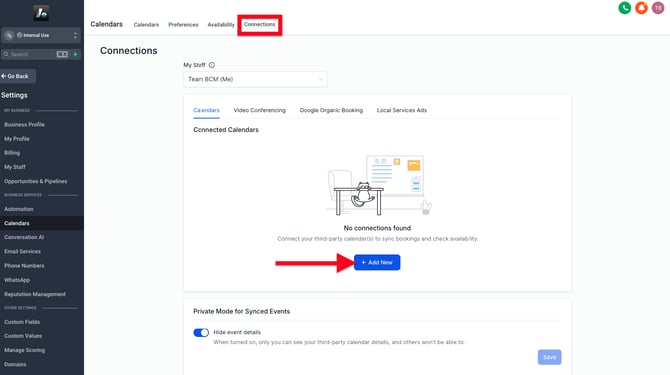
To connect:
-
Go to Calendar Settings → Connections → + Add New → Connect
-
Choose your calendar platform and follow the login steps
-
(For platforms like Google) After connecting, return to select which specific calendar you want to sync
This integration allows AutoClients.io to:
-
Show your real-time availability
-
Block off time slots already taken in your personal calendar
-
Sync new appointments to your external calendar automatically