
You can integrate video conferencing tools with your AutoClients.io calendar to automatically generate and send meeting links when appointments are scheduled.
🔗 Supported Platforms
-
 Zoom
Zoom -
 Google Meet
🚀 How to Connect a Video Tool
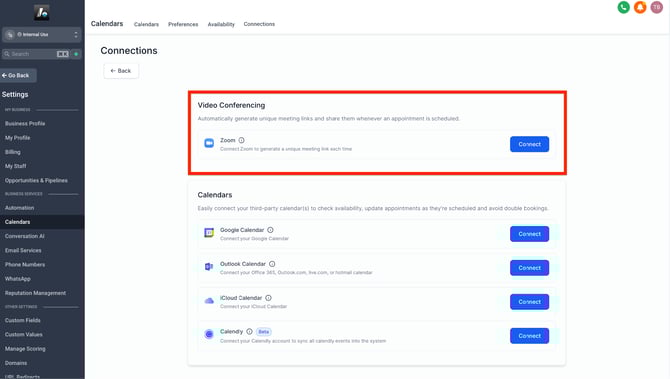
- Go to Calendar Settings → Connections → Video Conferencing → Add New
- Choose the tool you want to connect (e.g., Zoom)
- Follow the sign-in and authorization steps to complete setup
💡 If you're using Google Meet, it becomes available automatically when you link your Google Calendar — no extra steps needed.
⚙️ Set Your Default Meeting Location
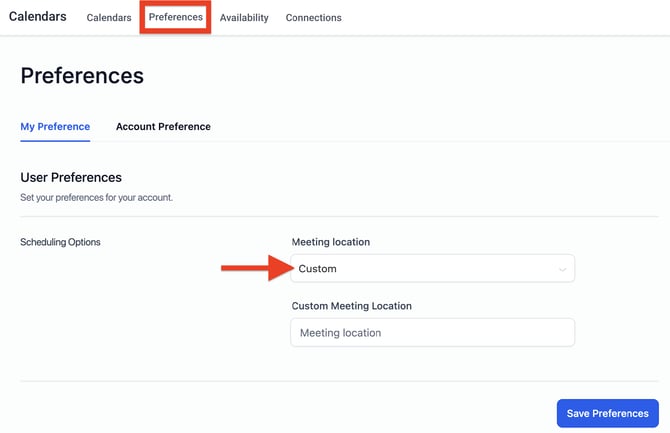
After connecting your video platform:
-
Go to Calendar Settings → Preferences
-
Set your default location to Zoom or Google Meet
-
Click Save Preferences to apply changes
This ensures every appointment booked through your calendars includes the correct video meeting link.